Day Trading Practice Account: How to Set Up and Run Your First Week
Sep 4, 2026
Written by: Al Hill
✓ Reviewed by Kunal Vakil, Co-Founder of TradingSim · Updated Sep 5, 2026
Day Trading Practice Account: How to Set Up and Run Your First Week
Most traders open a practice account the same way they open a bag of chips. They tear into it, click around for twenty minutes, place a few hundred-share orders on whatever ticker is moving, and walk away with nothing but a vague sense that the platform has a lot of buttons. I have watched this pattern for years, and I can tell you the first week in a practice account decides whether the account teaches you anything at all. This article covers how I would set one up today, how big it should be, and exactly what to do on each of your first five days.
A day trading practice account is a simulated account that lets you place trades against real historical market data without risking money. To set one up, pick a platform that replays full trading sessions rather than a delayed live feed, set the starting balance to match the cash you would actually fund a live account with, and build a workspace holding a chart, an order ticket, and Time and Sales. Then structure the first week: watch a complete session on one symbol before placing any trade, learn market, limit, and bracket orders one day at a time, and finish by trading a full session at normal speed with every trade journaled. The goal of week one is not profit. It is learning the platform, sizing honestly, and building the review habit that separates deliberate practice from entertainment.
What a Day Trading Practice Account Actually Needs
Not every free demo qualifies as a practice account worth your week. Day trading is a speed game played in seconds and minutes, and the SEC's investor education site is blunt about the risk: rapid intraday trading can produce substantial losses in a very short period of time. The whole point of practicing first is to move those early, expensive lessons into an environment where they cost nothing. That only works if the environment behaves like the real thing.
Three features matter more than everything else combined. First, real historical data you can replay. A practice account running on a live delayed feed only lets you practice whatever today happens to be, and most days are not worth practicing. Replay lets you load a trending day, a choppy day, or a gap day on demand. I keep a working list of dates worth revisiting, the same way my practice drills article recommends. Second, realistic order handling. In TradingSim's replay, an order will not fill while the session is paused. Submit with replay stopped and the platform rejects it outright. That sounds like a nuisance until you realize it is the point: real markets do not wait for you either. Third, a full order ticket. You need market, limit, and stop orders plus a bracket with take profit and stop loss attached, because exits are the thing beginners most need reps on.
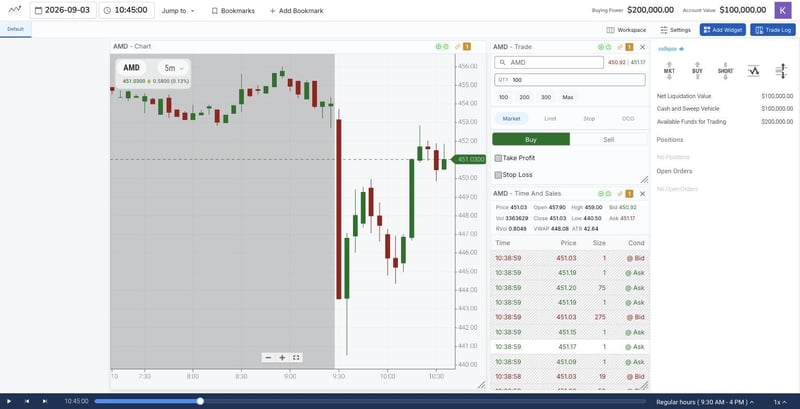
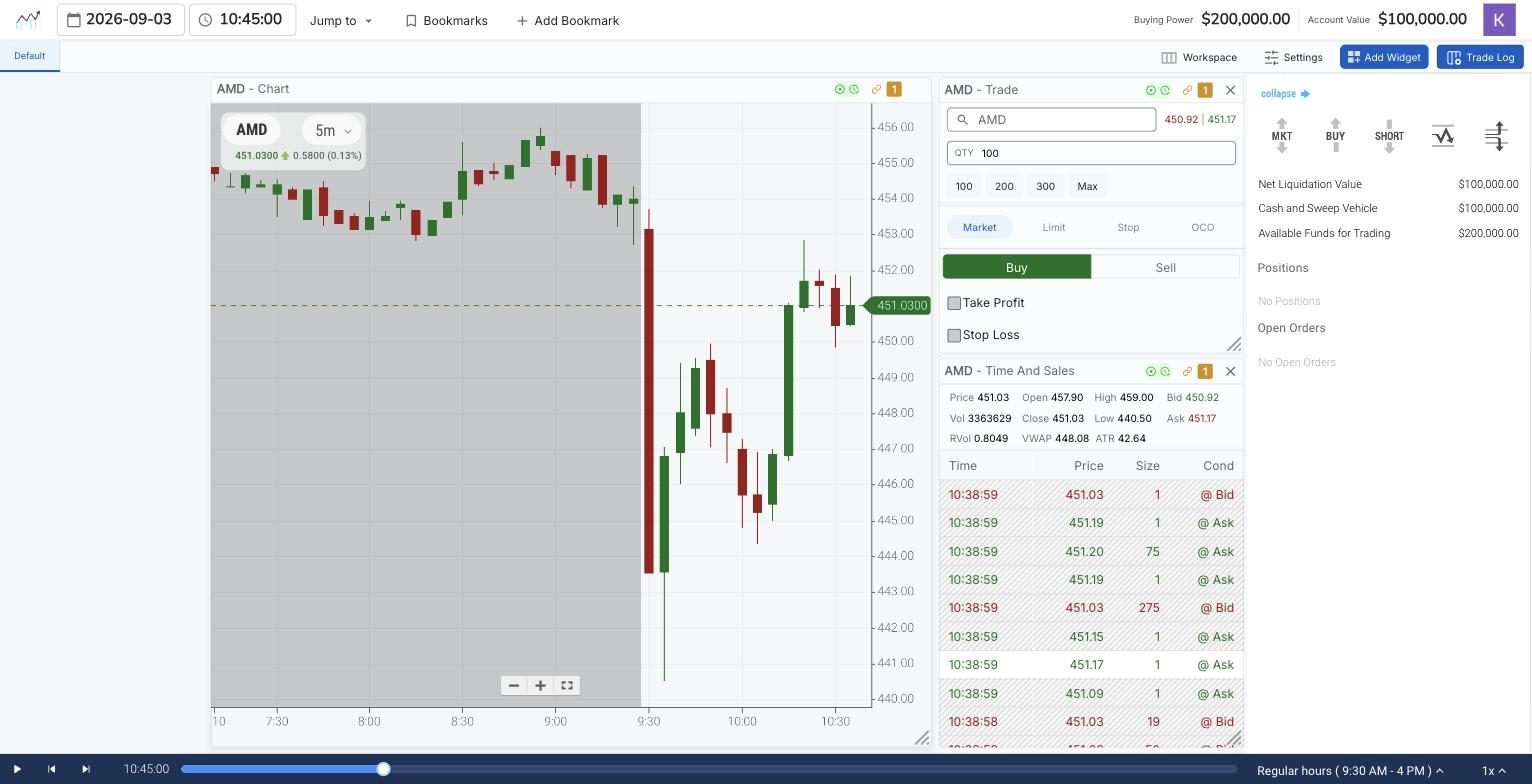
The three-widget practice workspace in TradingSim Next Gen: AMD five minute chart, trade ticket, and Time and Sales, session of September 3, 2026, replayed to 10:45 a.m. ET at 1x speed. The Time and Sales header shows the session stats: open 457.90, high 459.00, low 440.50, last 451.03 against a VWAP of 448.08. The grey region left of the 9:30 open is pre-market, and the replay scrubber sits along the bottom.
Setting Up the Workspace in Ten Minutes
Here is the setup I would run in TradingSim Next Gen, and the same logic applies to any serious day trading simulator. Start with three widgets: a chart, a trade ticket, and Time and Sales. Skip everything else for week one. A screen full of scanners and news panels looks professional and teaches nothing while you are still learning what a clean five minute chart is telling you.
Set the chart to a five minute timeframe. The platform's timeframe list runs from single ticks through seconds bars up to thirty minutes and beyond, and the seconds bars earn their keep later for reading momentum around an entry. They are a distraction in week one. Five minutes forces patience.
Then load a session using the date picker rather than whatever loads by default. Pick a normal day, not a crash or a short squeeze. The picker offers recent market dates as one-click shortcuts, which is the fastest route. Set playback to a moderate speed to get oriented. TradingSim defaults to ten times real speed, which is fine for scouting a session, and week one should end at one times speed, which is where the real practice happens. One more habit worth building on day one: the time field at the top of the workspace is editable, so you can type a time like 09:28:00 and jump straight to the moments before the open instead of scrubbing. You will also notice pre-market activity rendered as a grey shaded region to the left of 9:30. Learn to read it early, because as I covered in my pre-market trading guide, the session before the session tells you which levels matter.
Size the Practice Account Like the Account You Will Actually Fund
This is the step almost everyone skips, and it quietly ruins the entire exercise. If you plan to open a live account with $5,000, a $100,000 practice account is not practice. Every position you size, every drawdown you absorb, every profit target you hit is calibrated to a bankroll ten to twenty times larger than the one you will trade. The habits will not transfer, a problem I dug into in my article on sim habits that transfer to live trading.
While you are deciding on that number, know the current rules, because they changed recently. For more than two decades, US day traders in margin accounts lived under the pattern day trader rule and its $25,000 minimum equity requirement. That regime is being retired. Effective June 4, 2026, FINRA replaced the day trading margin provisions, including the pattern day trader designation, with new intraday margin requirements. Under the new framework there is no $25,000 minimum and no trade counting. Instead, your broker monitors whether your account holds adequate equity against your open positions throughout the trading day, and repeated failures to cover an intraday deficit promptly can get an account restricted for up to 90 days. Two caveats matter. Brokers have a transition window that runs until October 20, 2027, so your specific firm may still enforce the old pattern day trader restrictions for a while yet, and $2,000 remains the minimum equity to trade with leverage in a margin account at all. Check with your broker before you assume either rule set applies to you.
The practical takeaway for your practice account: the regulatory floor for day trading small accounts is coming down, which makes honest small-account practice more relevant, not less. Set the sim balance to your real number and let the constraint teach you position sizing from day one.
Your First Week, Day by Day
Five days, one symbol, one timeframe. Pick a liquid large-cap stock and stay on it all week. Switching tickers daily feels productive and resets your learning every morning.
Day one, watch and mark. No trades at all. Load a full session and let it replay at a few times real speed. Mark the opening range, note where the first pullback found buyers, and watch how Time and Sales pace changes when price approaches a level. Then replay the same session again. The second viewing is where you start seeing structure instead of noise.
Day two, learn the ticket. Place market orders, limit orders, and stop orders while the session runs, small size, no goal beyond mechanics. Notice the details: the ticket in TradingSim is position-aware, so once you are short, the buttons flip to cover, which is exactly the kind of small friction you want to have already met before real money is attached to it.
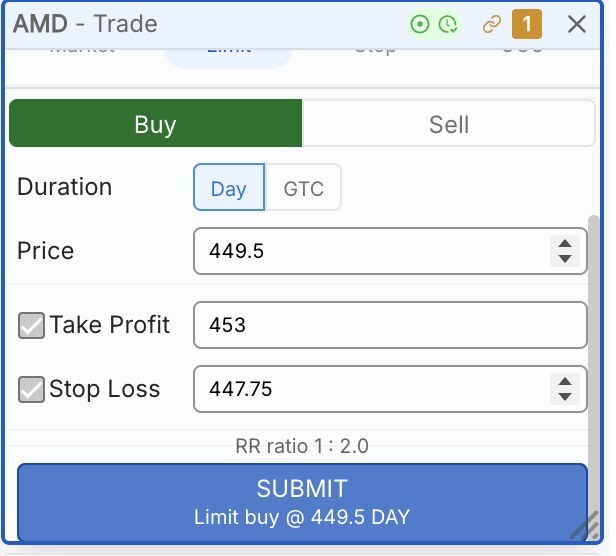
Day three, brackets only. Every entry goes out with a take profit and a stop loss attached using the ticket's bracket checkboxes, and the ticket shows you the risk-reward ratio as you set them. Force yourself to define both exits before entry, every single time. This one habit, installed in week one, is worth more than any indicator you will ever add.
Day four, one setup, journaled. Choose a single setup, something as simple as a pullback to the opening range high, and take only that trade all session. Log every instance: time, entry, stop, target, outcome, and one sentence on what you saw. The point is repetition against a defined standard, the same principle behind the structured sessions in my daily trading routine article.
Day five, full dress rehearsal. Trade the open through lunch at one times speed, bracket orders, real-size positions for your account number, full journal. At one times speed you will feel the thing the fast replays hide: boredom, and the itch to trade when nothing is happening. Meeting that itch in a sim is the entire reason the sim exists.
The day three exercise on the same AMD session, September 3, 2026: a day limit buy at 449.50 with Take Profit checked at 453.00 and Stop Loss at 447.75. The ticket computes the risk-reward ratio for you, 1 : 2.0 here, and at 100 shares the defined risk is $175 against a $350 target.
Let Wyckoff Structure What You Watch
If you want a lens for day one's observation work, use the one I reach for constantly: Wyckoff. An ordinary intraday session cycles through the same phases Wyckoff described a century ago. Price marks down into a level where selling dries up, builds a base while volume quiets, then marks up when demand finally overwhelms the sellers who remain. Your day one job in those terms: find where the morning move stopped, watch how long price based, and note what volume did as the base resolved. You do not need to name every phase correctly. You need the habit of asking which side is absorbing the other, because that question keeps you from buying the middle of a markdown, which is the classic first-week donation. Replay is the ideal Wyckoff classroom, since you can rewind the same accumulation base five times until the volume signature is familiar.
What to Record From the Very First Session
Your journal starts on day one, not when you feel ready. Six fields are enough: date and time of each trade, the setup name, entry and exit prices, planned stop and target, actual result, and one honest sentence about your state of mind. At the end of the week, read the whole thing in one sitting. You are looking for two numbers: how many trades matched your written setup, and how many were boredom clicks. In first weeks I have reviewed, the boredom clicks usually win, and seeing that ratio in your own handwriting changes behavior faster than any lecture.
First-Week Mistakes That Build Bad Habits
A few failure patterns show up so reliably that you should assume they are coming for you too. Oversizing because the money is fake is the big one, and it is why the account sizing step matters so much. Trading every session at ten times speed is another: fast replay is for scouting days and reviewing structure, not for practicing execution, because it teaches you a decision rhythm no live market will ever match. Skipping the second replay of a session wastes the single biggest advantage a trading simulator has over live paper trading. And quitting the week early because the practice feels repetitive misses the point. Repetitive is what skill acquisition feels like from the inside.
One more: treating the practice account as a permanent residence. It is a classroom, not a bunker. Once your journal shows a few weeks of consistent rule-following on one setup, the question becomes when to go live, and I wrote a separate piece on how long you should paper trade before going live that takes that question seriously.
Frequently Asked Questions
What is a day trading practice account?
A day trading practice account is a simulated brokerage account that lets you place intraday trades with virtual money against real market data. The best versions replay full historical sessions bar by bar, fill orders only while the market replay is running, and provide the same order types you would use live, including bracket orders with an attached stop loss and take profit.
Do I still need $25,000 to day trade?
As of June 4, 2026, FINRA's new intraday margin requirements replaced the pattern day trader rule, so there is no longer a regulatory $25,000 minimum equity requirement or a trade-count designation. Brokers have until October 20, 2027 to fully transition, though, so some firms may still apply the old pattern day trader restrictions for now. A $2,000 minimum still applies for leveraged trading in a margin account. Confirm with your broker which framework governs your account.
How much virtual money should I put in a practice account?
Set the practice balance to the amount you realistically plan to fund a live account with, not the default six figures. Practicing with an inflated balance calibrates your position sizing, risk tolerance, and expectations to an account you do not have, and those habits transfer poorly when real money is on the line.
How long should I use a practice account before trading real money?
Judge readiness by evidence, not by a calendar. A reasonable bar is several consecutive weeks of journaled sessions in which the large majority of your trades follow your written setup and your rule violations trend toward zero. For most traders that takes longer than one month and the first week is purely foundational.
Can I practice day trading futures in the same account?
Yes. TradingSim's replay supports futures contracts such as the E-mini and Micro E-mini S&P 500 alongside equities, so you can run the same first-week structure on a futures contract. Keep in mind that futures data behaves differently in some respects. In TradingSim, Time and Sales is available on the E-mini S&P 500, and futures do not carry the equity-style Level 2 book.
When you are ready to run this first week for real, the replay, the bracket ticket, and the journaling reps are all waiting inside a practice account you can open in minutes. Load one good session, set your real number as the balance, and start with day one: watch, mark, and replay it again.
Tags:
About the Author
Al Hill
Co-Founder & CEO, TradingSim
Alton Hill is the Co-Founder of TradingSim with over 18 years of trading experience. He completed the Design Thinking Bootcamp at Stanford’s D.School and brings expertise in Product Development to create the best trading simulation experience. His strategy focuses on trend-following systems, targeting high-volatility stocks with strong primary trends using the 15-minute chart.
How to Day Trade without $25k [Updated August 2026]
For most retail traders the hurdle to begin day trading can be pretty high. One of the reasons for this is that you are limited to the number of day trades you can make if your account falls below a...
Day Trading Rules for Stocks, Options, and Futures [Updated July 2026]
Day trading refers to buying and selling any financial instrument, such as stocks, bonds, options, ETFs, etc., within the same day without holding the position open beyond the close of the trading...
Day Trading Simulator: How to Practice Trading Without Risking Real Money in 2026
Nobody gets good at trading by reading about trading. I spent my first years learning that the expensive way, and after two decades in the markets I can tell you the single biggest edge a new trader...








 Day Trading Basics